
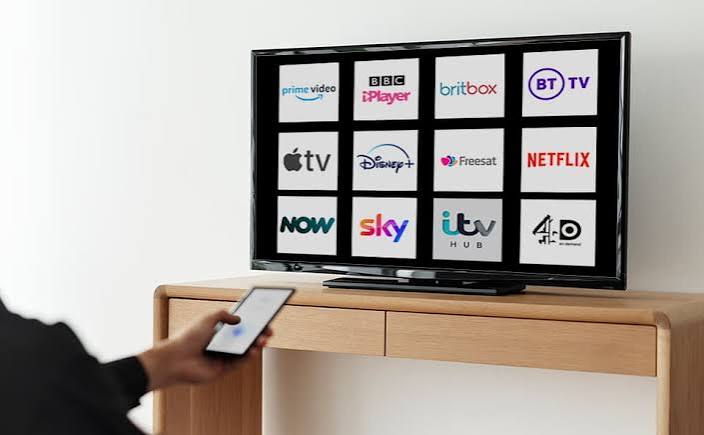
Key Takeaways
- UK households now choose between five separate categories of digital television options: aerial-based Freeview, satellite-based Freesat, the newer broadband platform Freely paid streaming subscriptions and IPTV services layered on top of an existing broadband connection.
- Freeview and Freesat remain free after the equipment cost, and Freely, the broadcaster-backed platform from Everyone TV, now carries more than 70 live channels over Wi-Fi with no aerial or dish required.
- Ad-supported streaming tiers look cheap at first glance. Amazon charges £2.99 a month just to remove ads from Prime Video, and NOW’s “Saver” prices jump once the minimum term ends.
- Netflix Premium (£18.99/month) and Disney+ Premium (£14.99/month) remain the most complete single-service options for families who want 4K and multiple screens.
- BBC iPlayer, ITVX and All4 are free aside from the TV licence needed for live BBC content, and together they cover a huge amount of UK-specific viewing that paid platforms don’t touch.
- A new Ofcom draft code, open for consultation until 7 August 2026, will pull Netflix, Prime Video and Disney+ under broadcast-style rules for the first time, including fresh subtitle and audio description quotas.
- Sport remains the single biggest reason UK households overspend on television. TNT Sports and Sky Sports both cost more per month than three entertainment subscriptions combined.
Digital television options in the UK go well beyond picking a streaming app and hoping for the best. Between Freeview, Freesat, the newer Freely platform, a stack of paid streaming services, and IPTV apps running over your existing broadband, the average household is now choosing across five different delivery methods without anyone explaining how they actually differ.
This guide breaks down what each option costs in August 2026, who it suits, and two things most comparison articles skip: the real cost of “free” ad tiers once the fine print kicks in and a genuinely new Ofcom regulation about to change how the big streamers operate here. If you want a straight answer on which digital television options in the UK are worth your money and which ones are worth keeping simply because they’re already free, this is it.
What Are the Digital Television Options in the UK Right Now?
Five distinct categories cover almost every household. Freeview uses a rooftop or set-top aerial and carries over 70 channels for free once you own a tuner or box. Freesat does the same job over a satellite dish, with a wider channel count and better picture on some HD services. Freely, launched by the BBC, ITV, Channel 4 and Channel 5 through their joint venture Everyone TV delivers those same public-service channels over broadband instead, which matters if your aerial reception is patchy.
Paid streaming subscriptions, Netflix, Disney+, Amazon Prime Video and the rest, sit on top of any of those as optional extras. IPTV services form a fifth category, delivering live channels and on-demand content over your internet connection through apps rather than a broadcast signal.
Netflix and Disney+ are still the strongest all-round paid choices for most households. Amazon Prime Video wins on value if you already pay for Prime delivery. NOW remains the most flexible route into Sky content without signing a contract. Freeview, Freesat and Freely cost nothing beyond the equipment, and for a huge share of UK viewing, that’s genuinely all most people need.
Here’s how the major streaming players compare on price as of August 2026:
| Service | Cheapest Tier | Mid-tier | Top Tier | Best For |
|---|---|---|---|---|
| Netflix | £5.99 (ads) | £12.99 | £18.99 | Original drama, global library |
| Disney+ | £5.99 (ads) | £9.99 | £14.99 | Family, Marvel, Star Wars |
| Amazon Prime Video | £8.99 (with ads) | £11.98 (ad-free) | — | Bundled with Prime delivery |
| HBO Max | £6.99 (ads) | £9.99 | £12.99 | Prestige drama, HBO originals |
| Apple TV+ | £9.99 (flat) | — | — | Small, high-quality original catalogue |
| Paramount+ | £6.99 | £10.99 | — | CBS content, Star Trek, kids’ shows |
| NOW Entertainment | £3.99 (6-month Saver) | £7.99 | — | Sky box sets without a dish |
| ITVX Premium | £5.99 | £59.99/year | — | British drama, ad-free ITV |
| Discovery+ | £3.99 | £6.99 (Eurosport) | — | Reality TV, documentaries |
Almost every paid provider now runs a three-tier model built around advertising. That’s the biggest shift in UK streaming pricing since 2023, and it’s why the free platforms in the next section matter more than most people give them credit for.
Free-to-Air Digital TV: Freeview, Freesat and Freely Compared
Before spending a penny on subscriptions, it’s worth understanding what’s already sitting on most UK aerials for free. Freeview switched the country over from analogue in 2012 and still runs on digital terrestrial broadcasts from around 80 main transmitters. Most TVs sold since then have a built-in Freeview tuner, so for a huge number of homes the only real cost is a set-top box if you want recording or catch-up through Freeview Play.
Freesat takes a different route. It broadcasts via satellite from the Astra platform and carries a wider channel count than Freeview, somewhere around 200 versus Freeview’s 70-odd, plus more channels in HD. The trade-off is a dish installation, which puts off some renters and flat dwellers. Where it wins is reception. Freeview’s biggest weakness is geography: valleys, tall buildings and fringe transmitter areas can leave a household with a patchy signal no matter how good the aerial is. Satellite reception doesn’t have that problem across almost all of the UK.
Which Digital Television Option Costs Nothing After Setup?
Freeview, Freesat and Freely all sit in this category, and the choice between them mostly comes down to reception and hardware rather than price. Freely is the newest of the three, launched in 2024 by Everyone TV, the organisation jointly owned by the BBC, ITV, Channel 4 and Channel 5 that runs free TV in the UK. It delivers the same public-service channels over broadband rather than an aerial or dish, which is genuinely useful for flats with no aerial point or homes stuck in a reception blackspot.
Freely has grown fast through 2026. The platform passed 500,000 weekly active devices earlier in the year and now carries more than 70 live channels, with fresh additions including CNN, Bloomberg TV+, Talking Pictures TV and a run of regional local TV services covering cities like London, Liverpool, Birmingham and Leeds. TLC made the jump to free-to-air in January 2026 as part of the same push, a channel that used to sit behind a Sky or Virgin subscription.
Freely comes built into newer smart TVs from Hisense, Panasonic, Sharp, TCL and others, with plug-in devices for older sets expected to follow. Ofcom’s current position is that terrestrial broadcast is guaranteed until at least 2034, so nobody needs to panic about Freeview disappearing, but Freely is clearly where the free-to-air broadcasters are putting their long-term investment.
The practical takeaway: if your aerial pulls in a clean signal, Freeview plus Freeview Play covers the essentials for nothing beyond a box. If reception is unreliable and you’d rather not deal with a satellite dish, Freely is worth checking on your next TV purchase. Freesat still makes sense for anyone who wants the widest free channel count and doesn’t mind the dish.
How Much Do UK Streaming Services Cost in 2026?
Headline prices for paid UK streaming subscriptions aren’t the full story anymore. Every major platform now treats ads as a pricing lever, and the gap between what’s advertised and what you’ll actually pay after six months is often bigger than it looks.
Take Amazon Prime Video. The standalone service sits at £8.99 a month, but that includes ads by default. Strip them out and you’re paying an extra £2.99 a month, pushing the real ad-free price to £11.98. That’s higher than Disney+’s ad-free standard tier at £9.99. Most comparison articles quote the £8.99 figure and stop there.
NOW plays a similar game with its Saver pricing. Entertainment membership advertises at £3.99 a month, which looks like the cheapest thing on the list. Read the small print, though, and that rate only applies for a six-month minimum term. After that it jumps to £7.99. Cinema follows the same pattern: £6.99 for six months, then £9.99. Comparing services on a promotional rate that expires in half a year isn’t really comparing like for like.
Netflix and Disney+ are more upfront about this. Their ad-supported tiers, £5.99 each, are ongoing prices rather than limited-time hooks. The trade-off is adverts breaking up your viewing and, on Netflix’s side, a noticeably smaller content library than what you’d get on Standard or Premium.
So before signing up for anything based on its cheapest advertised tier, check two things. Is that price permanent or promotional? And does “ad-supported” actually mean what you’re willing to sit through?
Which Streaming Service Is Best for Families?
Disney+ Premium (£14.99/month) and Netflix Premium (£18.99/month) are the two strongest paid options for UK families. Both allow four simultaneous streams in 4K and come with solid parental controls, but Disney+ edges ahead by having a catalogue that’s family-safe by default, not just by setting.
Netflix Premium matches Disney+ on screens and resolution, sure. But its library spans a lot more adult content, so you’re leaning on profile-level parental controls rather than a catalogue built with kids in mind from the start. Disney+ handles this more cleanly. Marvel, Star Wars, Pixar and National Geographic all sit under one roof, and their kids’ profiles are actually restrictive, not a box-ticking gesture.
Want live sport or terrestrial catch-up alongside the kids’ content? A NOW Entertainment membership with the Boost add-on (£6/month for 1080p and two simultaneous streams) can beat the cost of a second full subscription, especially if you’re only after specific box sets rather than the entire Sky library.
One more number worth knowing for family budgeting: Netflix Premium plus Disney+ Premium plus a NOW Entertainment Boost bundle lands around £40 a month combined. That’s a real line item, not pocket change, and it’s worth revisiting every few months as viewing habits shift.
Which Streaming Service Is Best for Sport?
TNT Sports (£30.99/month) and Sky Sports via NOW (flexible £34.99/month, saver £28.99/month with a 12-month minimum) currently dominate paid sport in the UK. DAZN (£29.99/month, or £14.99/month billed annually) is the stronger value pick if you’re mainly watching boxing, combat sports or specific football competitions rather than chasing the full Premier League and Champions League package.
This is where UK streaming budgets tend to spiral. A single month of Sky Sports through NOW costs more than Netflix Premium and Disney+ Premium put together. If you only follow one sport or one competition, it’s worth checking whether something like DAZN covers exactly that, rather than defaulting to the biggest and most expensive bundle available.
Also worth flagging: that 12-month minimum term on NOW’s Sky Sports Saver rate. Cheaper monthly price, yes, but you’re locked in for a year. That removes the flexibility that made NOW appealing as a no-contract alternative to satellite TV in the first place.
What Free On-Demand Streaming Is Legal in the UK?
BBC iPlayer, ITVX and All4 are completely legal, free UK streaming services and arguably the most underrated entry on this whole list. Together they cover a huge share of British drama, documentary, comedy and reality content that paid platforms simply don’t carry. The only real cost is the UK TV licence (£174.50 a year), which is legally required for live TV broadcasts and for using BBC iPlayer at all, catch-up content included.
ITVX and All4 don’t require a TV licence for on-demand viewing since they’re ad-supported and aren’t classed as live broadcasts in the same way. That makes them genuinely free for anyone who’s cut ties with traditional broadcast TV but still wants British content like Love Island, Derry Girls or The Great British Bake Off.
Comparison guides tend to lead with Netflix and Disney+, so it’s easy to forget how much of what UK audiences actually watch – comedy, soaps, and homegrown documentaries – sits behind these free services rather than any subscription at all. If cost is driving your decision, start here, with Freeview or Freely, before adding a single paid platform on top.
Where Does IPTV Fit Among UK Digital Television Options?
IPTV, short for internet protocol television, delivers channels and on-demand content over your existing broadband connection rather than through an aerial, dish or dedicated cable box. It sits alongside Freeview, Freesat, Freely and the streaming apps as another way of getting television onto a screen, and it’s become a common layer on Fire Stick, Apple TV, Android and smart TV setups precisely because it doesn’t need extra hardware beyond what’s already in most homes.
A service like ZumTV works as a companion access layer on top of your broadband, not as a broadcaster or a rights holder in its own right. That distinction matters. Any IPTV provider claiming exclusive access to specific licensed sports coverage or premium channel packages should be treated with scepticism, and it’s worth checking a provider’s channel list against what you can already get for free through BBC iPlayer, ITVX, All4 or Freely before assuming a paid IPTV subscription is adding something new.
Parental controls on most IPTV setups come from the third-party player app; TiviMate or IPTV Smarters Pro are the common choices, rather than from the underlying service itself, so it’s worth setting those up properly if kids will be using the same device. Buffering is the most common complaint with IPTV over standard UK broadband, and it’s usually a router or bandwidth issue rather than a fault with the service itself. Our guide to fixing IPTV buffering on UK broadband walks through the fixes that actually work.
Is Password Sharing Still Allowed on UK Streaming Services?
No single answer covers every provider. Netflix actively enforces household verification in the UK and will prompt for payment if it detects an account being used outside the primary residence. Disney+ rolled out similar restrictions but has enforced them more loosely through 2026, and several smaller platforms, including some sports and niche services, haven’t built enforcement systems at all.
For most UK households, credential sharing hasn’t gone away. It’s just gotten riskier, and the risk depends entirely on which service you’re talking about. Netflix’s crackdown genuinely pushed a chunk of shared accounts into paid “extra member” add-ons or brand new subscriptions. Disney+ took a softer line, probably because it’s still building UK subscriber numbers and doesn’t want friction that shoves people toward Netflix or Amazon instead.
Thinking about adding someone outside your household to an existing account? Check that provider’s current terms directly. Don’t assume what applied in 2023 or 2024 still holds. Enforcement has moved fast, and it’s inconsistent enough that treating “streaming services” as one category will give you the wrong answer for at least one of your subscriptions.
What Is Ofcom’s New Streaming Regulation and How Does It Affect You?
In May 2026, Ofcom published a draft code that would bring major streaming services, Netflix, Amazon Prime Video and Disney+ among them, under broadcast-style regulation in the UK for the first time. That’s a big deal. Netflix has never previously answered to Ofcom the way traditional channels like the BBC or ITV do.
The draft code applies to any on-demand service with more than 500,000 UK users. It introduces content standards around harm and offence, stronger protections for under-18s appearing in programming, rules against inciting crime or hatred, due impartiality requirements for news content, and privacy protections that mirror linear broadcast rules.
The part most likely to touch everyday viewers is the accessibility quota. Under the proposed code, covered platforms would need subtitles on 80% of their catalogue, audio description on 10%, and sign language interpretation on 5%. That’s aimed at better serving the UK’s 18 million-plus people living with sight or hearing disabilities. Public consultation runs until 7 August 2026, with final codes expected later in the year.
Two things matter here if you’re weighing up your TV setup right now. First, accessibility features that are currently patchy across platforms should get far more standardised over the next year, which is good news if subtitle or audio description quality has ever influenced your choice of provider. Second, this signals rising regulatory scrutiny of these platforms in the UK, not less. Worth watching if content standards or child safety matter to your household.
How Do I Choose the Right Digital Television Option for Me?
Start with what you actually watch, not what’s getting talked about. Mostly free-to-air staples, soaps, the news, and Saturday night entertainment? Freeview or Freely probably cover everything you need without a subscription. Mostly original drama and film? Netflix or HBO Max has you covered. Family content? Disney+ wins on catalogue safety. Live sport? Be honest with yourself about how many competitions you actually follow before committing to the priciest bundle on offer. And if cost is the priority above everything else, audit BBC iPlayer, ITVX, All4 and Freely before adding anything paid at all.
A simple framework that works for most UK households:
- Check what Freeview, Freesat or Freely already gives you for free, based on your aerial or broadband setup.
- List the two or three shows, franchises or sports you genuinely can’t live without.
- Check which single paid service covers the most of that list.
- Add a second service only if there’s a clear, specific gap. Not “just in case”.
- Review the whole stack every three to six months, since pricing and promotional terms shift constantly.
- Cancel anything you haven’t opened in the last month. Most services make this a two-minute process precisely because they’re betting you won’t bother.
Most people overpay not because any single subscription is a bad deal, but because nobody sits down and audits the full stack against what’s actually being watched or against what’s already sitting on the air for free. Treat it like any other monthly outgoing. At £40 to £70 a month for a typical multi-service household, that’s exactly what it’s become.
Final Thoughts
There’s no single winner in this whole space. The UK market has fragmented on purpose, splitting across free-to-air, satellite, broadband and paid subscription rather than converging on one dominant platform. What’s changed for 2026 is how much scrutiny is worth applying before you subscribe to anything: checking whether a cheap tier includes ads you’ll actually tolerate, whether a promotional price reverts after six or twelve months, and whether Freeview, Freely or a free BBC iPlayer, ITVX and All4 subscription already covers what you’re about to pay for somewhere else.
The Ofcom consultation running through August 2026 is also worth keeping an eye on if accessibility or content standards matter in your household. It marks the first time platforms like Netflix will face the kind of oversight the BBC or ITV have always operated under.
Want help working out exactly which combination of UK digital television options fits your household and budget? ZumTV tracks pricing changes, new releases and platform news across every major UK streaming service, so you’re never the last to know when a deal, a price hike or a new rule actually affects what you’re paying for.